Interactive tour
Explore what you’d sell, and how you’d run it.
Business phone systems and home lines under your brand, the Everyline apps, AI for business calls, and one partner portal your team runs every account from.
Harper Valley in Everyline for iPhone
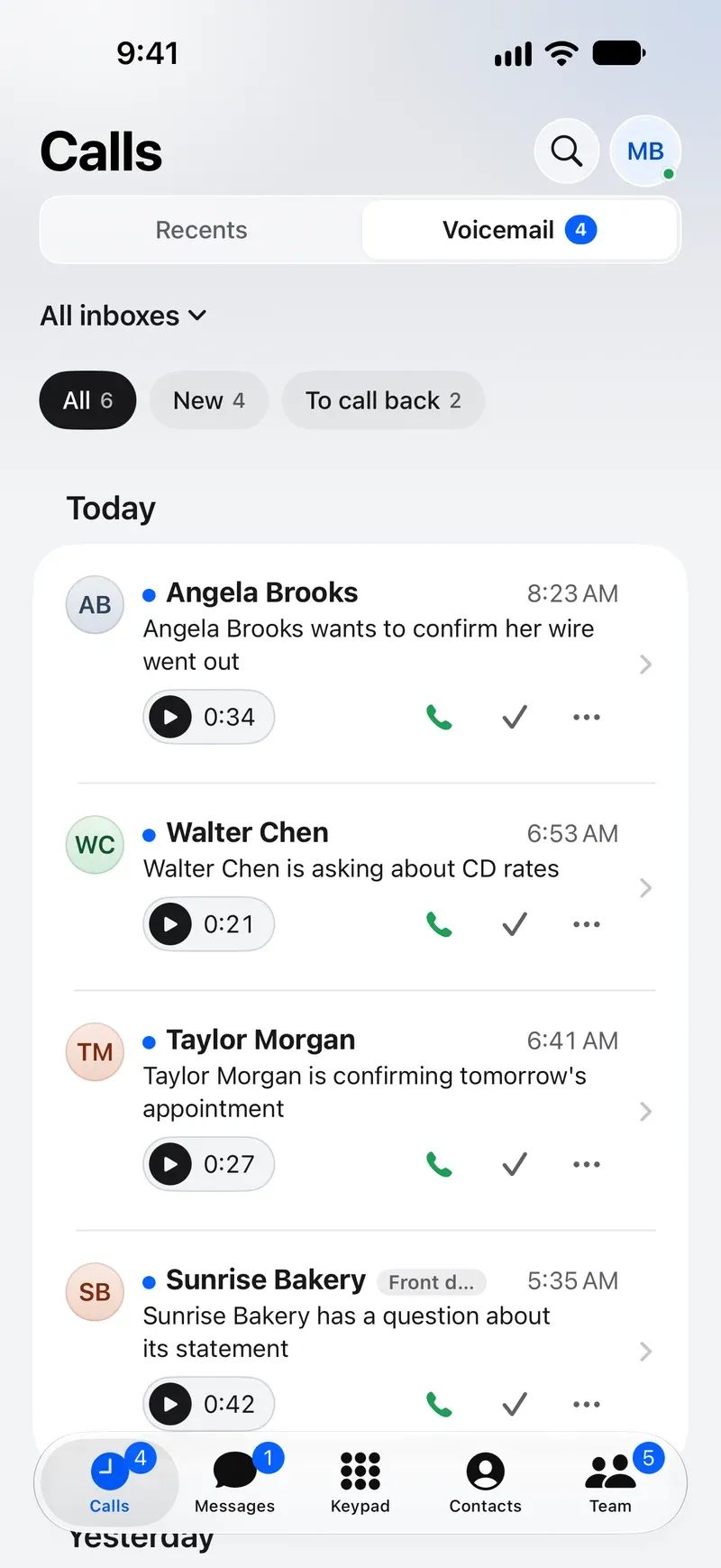
Everyline in their hands.Named Everyline for every provider, with your logo and support line inside.
Your partner portal
AccountsBusinesses and households
- Harper Valley National BankBusiness · Hosted PBX · SIP trunking · Virtual fax · Contact centerActive
- Rivera HouseholdHome · Home phone serviceActive
- Brightline Physical TherapyBusiness · Hosted PBXOnboarding
- Bennett HouseholdHome · Home phone serviceActive
Every business and household, one list.Your team brings each account into service and supports it from here.
01Business communications
A complete phone system for every business you serve.
Numbers and routing, desk phones, the Everyline apps and a front desk, run by each business from its own portal under your brand.
Business phone systemsEllen Brooks is calling the main line. Answer her.
Front desk
1 waiting · 2 of 7 free
Company calls: normal
Your call
No call right now. Answer one below.
Waiting 1
On hold
Nobody on hold.
Parked
Anyone can dial the slot to pick up.
Nothing parked.
Everyone
- David Park 201On hold · 0:48 · with James Carter
- Elizabeth Moreno 208Do not disturb
- Jennifer Walsh 210Forwarding calls
- Linda Foster 204Phone offline
- Mary Collins 202On a call · 4:12 · with (480) 555-0117
- Michael Brennan 206Free
- Robert Alvarez 203Free
Queues
- Member Services1 of 2 can take calls right now
- Card Services1 of 2 can take calls right now
Before anyone answers, the business’s rules decide.
Every call checks the same rules in order: a closure or forward someone turned on, then holidays, then the weekly hours. The first that applies decides where it goes, so the bank can close early in one press and its schedule stays as it was.
If none of its phones is online, calls can take a backup route the business chooses: a mobile, a group of outside numbers or voicemail.
Harper ValleyMain line (602) 555-0100
Tuesday, 2:10 PM · Eastern time
Every call checks these in order. The first that applies decides where it goes.
- Closure or forwardTurned on by hand, for a whileNothing onSends calls to Its own message and destination
- HolidaysSpecial days in Branch hoursNo special daysSends calls to That day’s own hours
- Branch hoursMon–Fri 9 AM–5 PM · Sat 9 AM–noonOpen until 5 PMDecides the call now, sending it to MenuMain Menu
- Outside hoursNights, weekends, closed daysFrom 5 PMSends calls to VoicemailMember Services voicemail
Branch hours are open, so calls to the main line go to the Main Menu.
Today: Main Menu from 9 AM to 5 PM, Member Services voicemail before and after.
The business runs it from its own portal.
Where each number’s calls go right now, the calls in progress, and every queue with who can take its calls. Queues and callbacks come with every business seat; a supervisor can listen, whisper or join.


One inbox the whole team answers texts from, with each caller’s calls in line.
Replies go from the number the customer texted, notes stay with the team, and everyone sees who has each conversation. Faxes have their own box.
In every business seat. A business texts once its registration is approved, and its customers’ consent is its to collect.
Shared business textingAnd the caller’s record, as it rings. Who’s calling, from HubSpot or Sonar, before anyone picks up, and the call logged on the customer’s record. Connected with the customer’s own HubSpot account or the ISP’s own Sonar instance.
Emergency calling (E911)
The room matters. So does the callback.
When someone at a business dials 911, the dispatcher gets their location’s registered address with their extension’s own room or desk, from a desk phone, the browser or the Mac app.
With the 911 Direct Callback add-on, the dispatcher’s call back rings the caller’s own phones and apps first, never a menu or voicemail. 911 alerts tell the business’s chosen people separately.
Main branch
Registered 911 address410 Valley Way, Phoenix, AZ 85004
Room or desk, by extension
- 201David ParkFL 2 OFC 210
A 911 call from 201 sends 410 Valley Way, FL 2 OFC 210, Phoenix, AZ 85004
- 202Mary CollinsFL 1 DESK 4
911 Direct Callback Add-on
When the dispatcher calls back
First: the caller’s extension
- Desk phone
- Mac app
- iPhone app
If unanswered: all extensions at that location
- 201
- 202
- 203
- 206
911 alerts Separate from the callback
- Linda Foster Branch manager · Text · Email
- Building security Security desk · Call
02Home phone
A home line on the phones they already own.
A home portal in plain words under your brand, control over who rings, Everyline where they want it, and help from your team. Sold beside your broadband.
Home phone serviceWhat the household signs into.
Today’s calls and messages, which number rings which phone, the 911 address and the four switches a household reaches for, in plain words under your logo.

Interactive exampleChoose how strict the Rivera household is with junk calls.
The same four callers
- A known robocall(602) 555-0187RingsThe phones ring.Rings SPAM#The handset’s screen says SPAM#.1Asked to press 1The phones ring only if they do.1Asked to press 1The phones ring only if they do.ChangedChangedChanged
- A number they’ve never seen(480) 555-0163RingsThe phones ring.RingsThe phones ring.RingsThe phones ring.1Asked to press 1The phones ring only if they do.Changed
- Someone who always ringsMarked Always rings in their contactsRingsThe phones ring.RingsThe phones ring.RingsThe phones ring.RingsThe phones ring.Every level
- A number they blockedOn their block listBusy signalNothing rings; no message.Busy signalNothing rings; no message.Busy signalNothing rings; no message.Busy signalNothing rings; no message.Every level
Changed from Let everything ring
- Known spam. Only calls known as likely spam are labeled or checked; other unfamiliar numbers ring unless every caller is checked.
- A check, not a guarantee. It asks for one key press, so it stops callers who can’t press 1, not every unwanted call.
- If they don’t press 1, the household chooses: hang up, take a message or say it’s blocked.
How the line reaches them.
- Their own phonesHandsets and a cordless base they already have
- Your adapterFrom your stock, assigned to their account
- Their broadbandYour service, the home’s router
- One home line(480) 555-0120, on our network
- Everyline and the browserThe same line on iPhone, Android or a browser tab, over their own internet connection
Calls to the house can ring their cell too, and they can return a missed call from their cell, showing the home number.
Ring my cellWhen they need help, they reach you.
Your logo and support contact are in their portal, and its Help page says whether their phones are working and walks them through an adapter gone offline.
What 911 depends on.
Emergency calling- Power. The adapter and the router run on the home’s power. While they’re off, so is 911 from the handsets.
- The internet connection. While it’s down, the adapter is offline, and so is 911 from those handsets.
- The registered address. 911 sends help to the address registered for the line. A move means updating it first.
03Everyline apps
The apps your customers answer with.
Calls, messages, voicemail and the team on iPhone, Android, Mac and the browser, on your customer’s own numbers, signed in with their portal login. No app of your own to build.
Everyline apps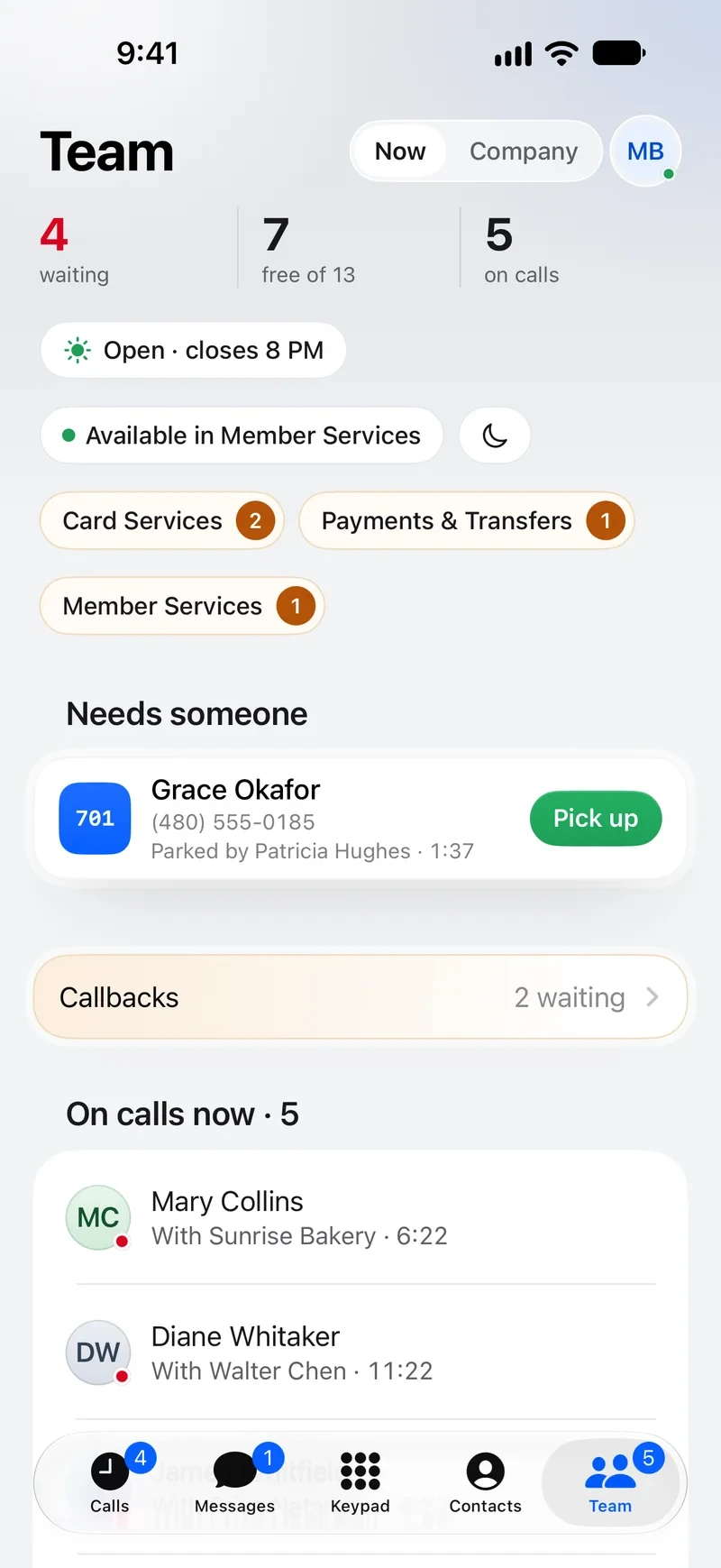
The whole company in their pocket.Who’s waiting and who’s on a call, the queues, a parked call to pick up and the callbacks, on iPhone.
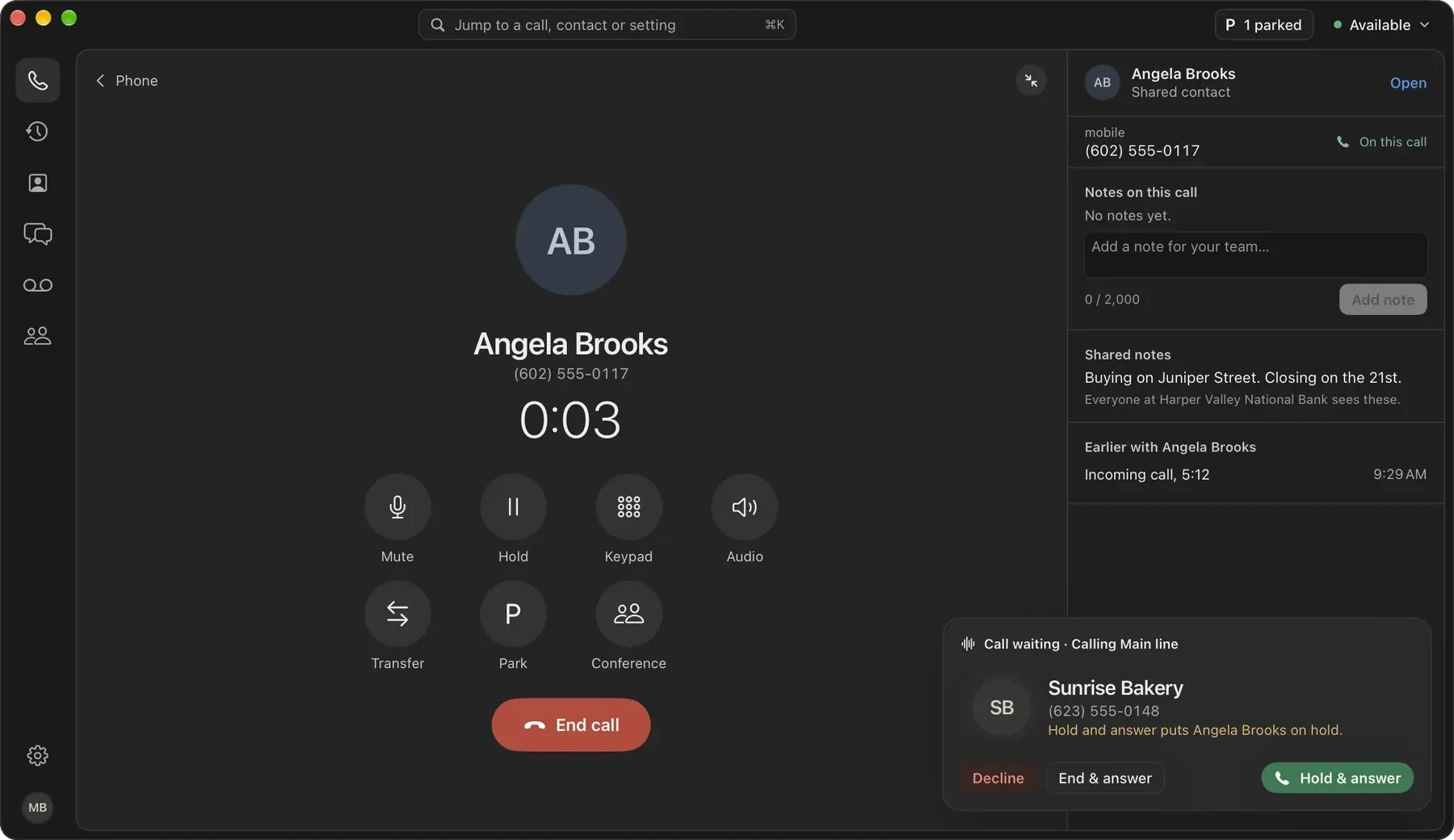
The same bank on a Mac.A second caller waits under the call; Hold & answer keeps both, nobody dropped.
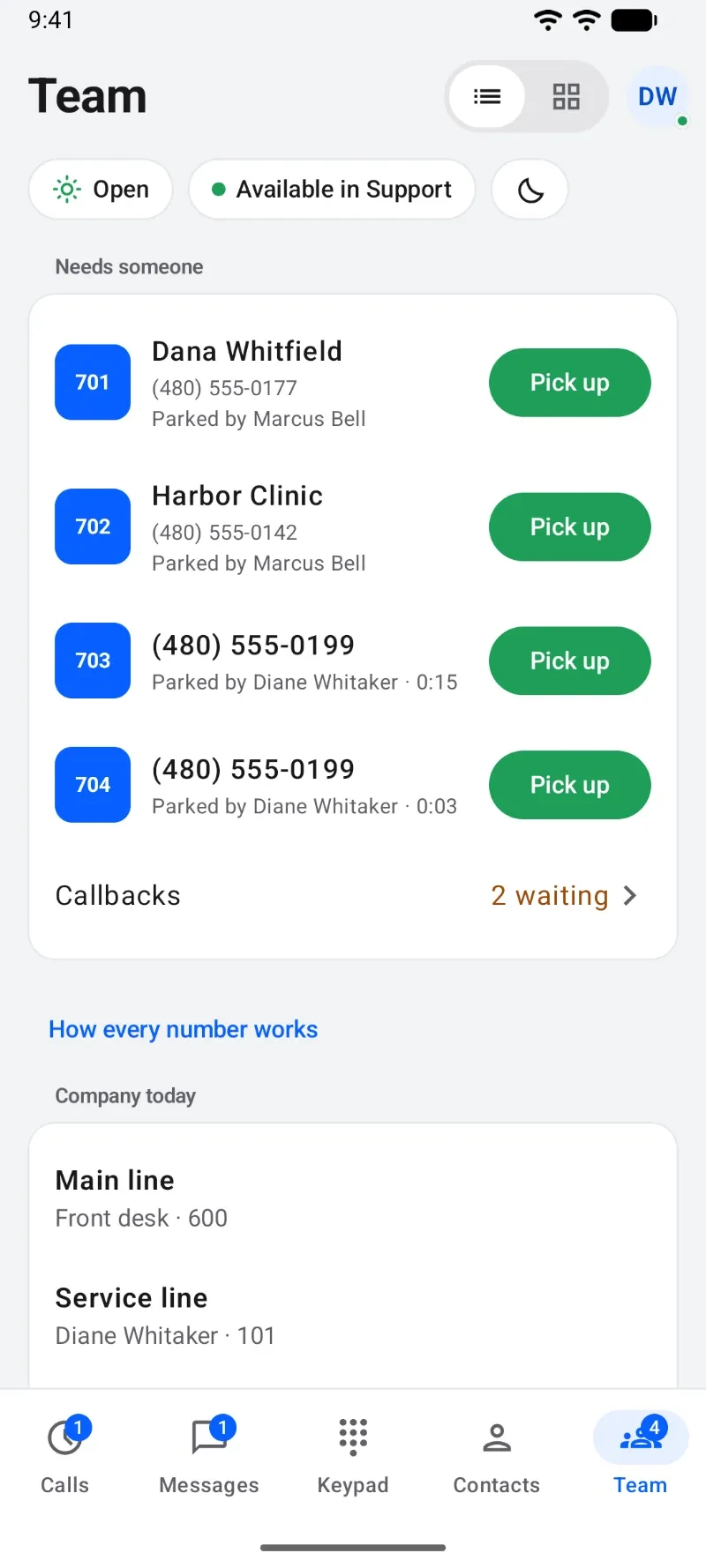
Android’s own switchboard.Each parked call with who parked it, a Pick up away.
One family, each app made for its device.
Everyline for iPhoneFor businesses and households
A household gets its own layout, led by a Home page in plain words; a business gets Calls, Messages, Keypad, Contacts and Team.
Customers get itThe App Store
Everyline for AndroidFor businesses and households
The team’s switchboard with the company’s park slots, and faxes scanned with the camera.
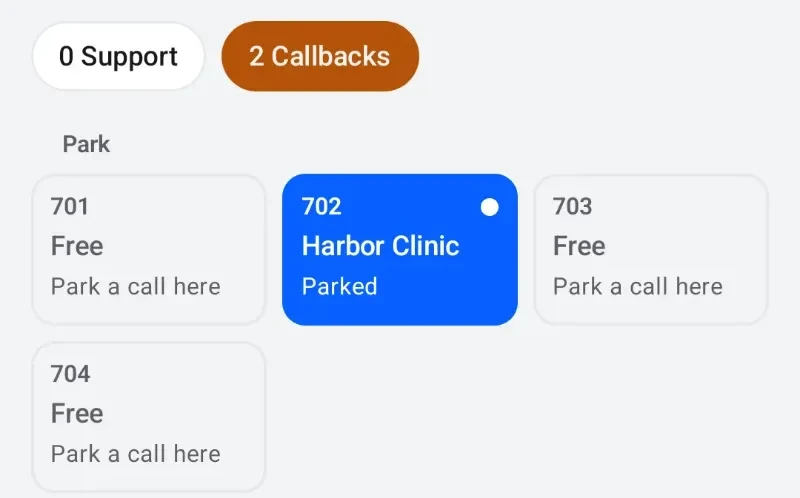
Customers get itGoogle Play
Everyline for MacFor businesses
A ringing call floats in a card above whatever is open; ⌃⌘A answers and ⌃⌘H hangs up while another app is in front.Not on the Mac: closing the company or forwarding every call, HubSpot and Sonar records, and the fax box.
Customers get itDownloaded from their portal
Calling in the browserFor businesses and households
Calls in the business and home portals, and for a business, a front desk showing who’s waiting and where to send each call.Browser calling
Customers get itTheir portal, nothing to install
04AI and insights
See what happened. Understand what needs attention.
Insights counts a business’s calls and opens the ones behind every chart. AI writes up what a recorded call said and promised, answers questions in plain words, and can answer a line.
Insights and AIInteractive exampleChoose any hour in the chart, then open one of its calls.
Busy hours
Each square is one hour of the week, added up over the period. Outlined: the main number’s open hours.
The hour chosen
Thursday, 2 PM to 3 PM
Five Thursdays added up: October 1, 8, 15, 22 and 29
- Calls in
- 97
- Answered
- 82%
- Missed
- 17
- Half answered within
- 1 min 3 s
The newest 5 of 97 calls.
AI · Call Transcription
Davis Mary’s call, recorded and transcribed.
The transcribed call from Thursday 2 PM’s list, on its page in the bank’s portal: what was said and promised, without replaying the whole call.
Call recording and transcriptionInteractive examplePress Play, find a phrase, or press a time in the summary to hear it.
Davis Mary
(480) 555-0121Caller ID
Name said on the call: Mary Davis
- Incoming call
- 1m 3s
- Answered by Mary Collins
- via Main line
- Thu, Oct 29 at 2:41 PM
Transcript English
Mary Collins
Davis Mary
Mary Collins
Mary Collins
Davis Mary
Mary Collins
Mary Collins
Davis Mary
Mary Collins
Davis Mary
Mary Collins
Davis Mary
Davis Mary1:03 · Answered by Mary Collins · Thu, Oct 29, 2:41 PM
Davis Mary0:07
Hi, my name is Mary Davis. I lost my credit card. Can you send me a new one?
Mary Collins0:41
Okay, I have put a replacement for your credit card. It will be coming in the mail within three to five business days.
Summary, written by AI
Lost credit card replacement request
Follow-up needed
A replacement card was ordered and is expected by mail within three to five business days. Promised at 0:41
AI · Topics
Why people call, and who needs a follow-up.
36 calls need someone to follow up.
Davis Mary’s lost card is one of the 186 service issues.
AI · Ask in Insights
Ask, in plain words.
An owner or admin asksWho answered the most calls this month?
Calls answered by person
Incoming calls answered, October 1 to 30, the top five
AI chose which figures answer the question; Insights counted them. Check anything important against the calls.
AI · AI receptionist
An AI receptionist that puts callers through.
- Calls the business sendsMain line, after hoursMain menu, key 0
- AI voice line 650An OpenAI or Grok voice agentCustomized for the business
- When it transfers a callerReceptionSupportSales voicemailDestinations the business allowed, with a fallback if a transfer isn’t
Included, and charged by use
Insights and Ask come with every business seat. Transcripts and summaries are charged by the AI minute. AI receptionists are a fixed monthly rate each, set by their customization, AI provider usage included.
You turn on, per business
Insights for charts, reports and Ask, and Call Transcription for transcripts and summaries, in your partner portal. Topics needs both.
The business allows the AI
Its owner, or a named admin, allows each AI permission; your team and our desk can’t. Charts and reports need none. Only people who may play a call can have it transcribed and read it.
What’s in a seat and what’s charged by use · AI permissions, in full
05Provider operations
Your team runs every account from one partner portal.
Bring each business and household into service, shape what it gets, see what needs attention and support it. The partner API reaches the same accounts from your own systems.
Partner portalHarbor Point Marina
Business · #100011
Active1 phone offline
Services
- Hosted PBX
Off: SIP trunking, Virtual fax, Messaging, Contact center
Customer portal visibilityHidden
Numbers and calls
- Numbers
- 2
- Calls, last 7 days
- 47
Sites and phones
Main office2 of 3 online
Fuel dock3 of 3 online
Needs attention
Yealink W73P
- Handset 1 · 101
- Not registered
- Last registered
- Today, 6:52 AM
- Network
- 198.51.100.15
Last 24 hours
- Went offlineToday, 6:52 AM
- Came onlineYesterday, 7:58 AM
Yealink T44W
- Line 1 · 103
- Registered
- Last registered
- Today, 8:20 AM
- Network
- 198.51.100.15
Last 24 hours
No changes in the last 24 hours.
Yealink T46U
- Line 1 · 105
- Registered
- Last registered
- Today, 8:20 AM
- Network
- 198.51.100.15
Last 24 hours
No changes in the last 24 hours.
Yealink T46U
- Line 1 · 102
- Registered
- Last registered
- Today, 8:20 AM
- Network
- 198.51.100.15
Last 24 hours
No changes in the last 24 hours.
Yealink W73P
- Handset 1 · 104
- Registered
- Last registered
- Today, 8:20 AM
- Network
- 198.51.100.15
Last 24 hours
No changes in the last 24 hours.
Yealink T44W
- Line 1 · 106
- Registered
- Last registered
- Today, 8:20 AM
- Network
- 198.51.100.15
Last 24 hours
No changes in the last 24 hours.
Brightline Physical Therapy
Business · #100003
Onboarding
Services
- Hosted PBX
Off: SIP trunking, Virtual fax, Messaging, Contact center
Customer portal visibilityHidden
Numbers and calls
- Numbers
- 2
- Calls, last 7 days
- 76
Sites and phones
Main office3 of 3 online
Warehouse2 of 2 online
Onboarding
What it needs before you mark it live
- Numbers, done
- Phones, done
- 911 on every line, done
- Owner, not yet
Your team marks it live. Nothing goes live on its own.
Yealink T46U
- Line 1 · 101
- Registered
- Last registered
- Today, 8:20 AM
- Network
- 198.51.100.7
Last 24 hours
No changes in the last 24 hours.
Yealink W73P
- Handset 1 · 103
- Registered
- Last registered
- Today, 8:20 AM
- Network
- 198.51.100.7
Last 24 hours
No changes in the last 24 hours.
Yealink T44W
- Line 1 · 105
- Registered
- Last registered
- Today, 8:20 AM
- Network
- 198.51.100.7
Last 24 hours
No changes in the last 24 hours.
Yealink T44W
- Line 1 · 102
- Registered
- Last registered
- Today, 8:20 AM
- Network
- 198.51.100.7
Last 24 hours
No changes in the last 24 hours.
Yealink T46U
- Line 1 · 104
- Registered
- Last registered
- Today, 8:20 AM
- Network
- 198.51.100.7
Last 24 hours
No changes in the last 24 hours.
Acme Dental
Business · #100000
Active
Services
- Hosted PBX
- Virtual fax
Off: SIP trunking, Messaging, Contact center
Customer portal visibilityCan change
Numbers and calls
- Numbers
- 4
- Calls, last 7 days
- 71
Sites and phones
Main office5 of 5 online
Warehouse4 of 4 online
Needs attention
Nothing needs attention: all good.
Yealink T46U
- Line 1 · 101
- Registered
- Last registered
- Today, 8:20 AM
- Network
- 198.51.100.4
Last 24 hours
No changes in the last 24 hours.
Yealink W73P
- Handset 1 · 103
- Registered
- Last registered
- Today, 8:20 AM
- Network
- 198.51.100.4
Last 24 hours
No changes in the last 24 hours.
Yealink T44W
- Line 1 · 105
- Registered
- Last registered
- Today, 8:20 AM
- Network
- 198.51.100.4
Last 24 hours
No changes in the last 24 hours.
Yealink T46U
- Line 1 · 107
- Registered
- Last registered
- Today, 8:20 AM
- Network
- 198.51.100.4
Last 24 hours
No changes in the last 24 hours.
Yealink W73P
- Handset 1 · 109
- Registered
- Last registered
- Today, 8:20 AM
- Network
- 198.51.100.4
Last 24 hours
No changes in the last 24 hours.
Yealink T44W
- Line 1 · 102
- Registered
- Last registered
- Today, 8:20 AM
- Network
- 198.51.100.4
Last 24 hours
No changes in the last 24 hours.
Yealink T46U
- Line 1 · 104
- Registered
- Last registered
- Today, 8:20 AM
- Network
- 198.51.100.4
Last 24 hours
No changes in the last 24 hours.
Yealink W73P
- Handset 1 · 106
- Registered
- Last registered
- Today, 8:20 AM
- Network
- 198.51.100.4
Last 24 hours
No changes in the last 24 hours.
Yealink T44W
- Line 1 · 108
- Registered
- Last registered
- Today, 8:20 AM
- Network
- 198.51.100.4
Last 24 hours
No changes in the last 24 hours.
Canyon Freight
Business · #100004
Active
Services
- SIP trunking
Off: Hosted PBX, Virtual fax, Messaging, Contact center
Customer portal visibilityCan change
Numbers and calls
- Numbers
- 12
- Calls, last 7 days
- 95
Sites and phones
No phones on this account. Its calls come through its SIP trunk.
Needs attention
Nothing needs attention: all good.
Bennett Household
Home · #100040
Active
Service
- Home phone service
Customer portalThe household’s home portal
Numbers and calls
- Numbers
- 2
- Calls, last 7 days
- 66
Sites and phones
Home2 of 2 online
Needs attention
Nothing needs attention: all good.
Grandstream HT812
- Port 1 · 101
- Registered
- Last registered
- Today, 8:20 AM
- Network
- 198.51.100.4
Last 24 hours
No changes in the last 24 hours.
Grandstream HT812
- Port 1 · 102
- Registered
- Last registered
- Today, 8:20 AM
- Network
- 198.51.100.4
Last 24 hours
No changes in the last 24 hours.
The same accounts, in the partner portal itself.
What a phone’s setup and registration showEvery business and household in one list. Try Needs attention, or search for an account.
Accounts
- Acme DentalBusiness · #100000Business · #100000 · 9 of 9 phones onlineActiveAll good9/9471
- Anderson & Cole LawBusiness · #100001Business · #100001 · 14 of 14 phones onlineActiveAll good14/14684
- Bennett HouseholdHome · #100040Home · #100040 · 2 of 2 phones onlineActiveAll good2/2266
- Blue Mesa VeterinaryBusiness · #100002Business · #100002 · 7 of 7 phones onlineActiveAll good7/7380
- Brightline Physical TherapyBusiness · #100003Business · #100003 · 5 of 5 phones onlineOnboardingAll good5/5276
- Canyon FreightBusiness · #100004Business · #100004 · No phonesActiveAll goodNo phones1295
- Cedar Ridge RealtyBusiness · #100005Business · #100005 · 11 of 11 phones onlineActiveAll good11/11568
- Copper State PlumbingBusiness · #100006Business · #100006 · 22 of 22 phones onlineActiveAll good22/22887
Every account at once, on Home.
Your team’s first page: the whole customer base in four figures, what needs attention most urgently, and what each new account still needs. Accounts start in Onboarding, made here or through the partner API, and go live only when your team marks them live.

How much each business runs.
- HiddenPhone System and Company settings stay with your team
- View onlyThe business reads its Phone System and changes none of it
- Can changeIts owners and admins change both
Where each customer’s numbers come from.
- New numbersFind available local or toll-free numbers for a new customer or location, and assign them in your partner portal.
- Port existing numbersFollow each transfer by stage, and see whose move comes next.
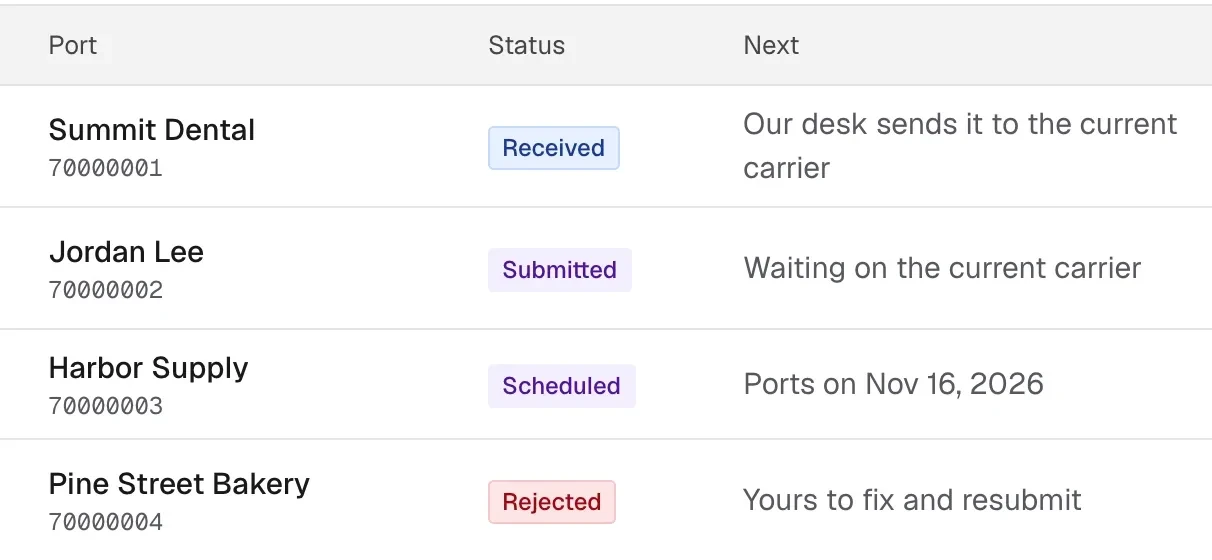
- Bring your own carrierKeep numbers with your existing origination provider, and have it send their incoming calls to Carrier Grade.

From your shelf to their desk.
Every phone and adapter you hold is one record in Devices, found by its MAC address, from a shelf you name to a customer’s account. Paste a shipment or scan a label, then open any phone to see whether it fetched its settings and its line is registered.
Device inventory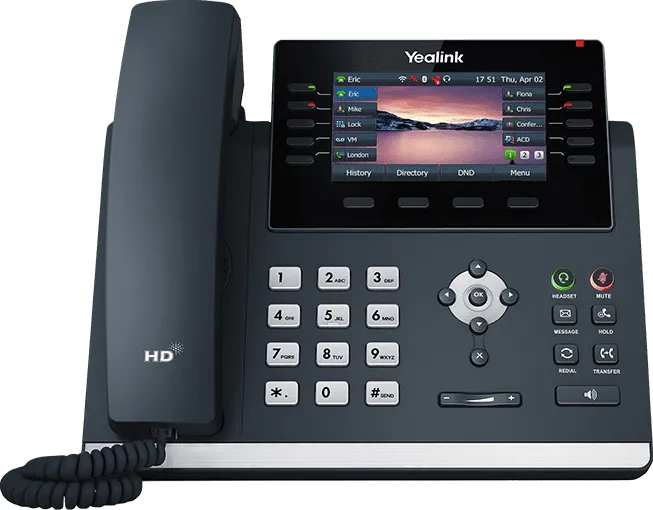
Your partner portalDevices
80:5E:C0:4D:21:9A
In stockShelf B
Nov 12 · Jordan Lee added a device
Never connectedMesquite Family Dental · Ext 104
Nov 18 · Jordan Lee assigned a device
80:5E:C0:4D:21:9AOnline
Line 1Ext 104 · Front deskRegistered
Your team, and our desk.
Your team does the account work and supports your customers; our desk does what reaches carriers and the network, and takes what your team escalates.
| Work | Your team, in the partner portal | Our desk |
|---|---|---|
| Ports | Enter the port and fix a rejection | Send it to the current carrier |
| Phones | Add, assign, restart, replace | Firmware; read a phone’s settings |
| Outages and planned work | See the notice customers see | Post it, take it down |
| Troubleshooting | Ask the customer for a window | Traces and captures inside it |
- Your team’s roles. Admin, Staff or Billing, each signing in with a second step, a passkey or an authenticator app. Only your admins manage the team; a role covers every account you serve.
- In your partner portal. A call’s details and whether it was recorded, never the recording or its transcript.
- Inside the customer’s portal. Your Admin and Staff can play a recording through Open portal; each play shows in the customer’s Activity as Support.
- Troubleshooting, when the customer approves. Our desk reaches traces, captures and recordings only in a window the customer’s owner or admin approves. Your partner login can’t approve on a customer’s behalf.
Tell us who you serve and what you want to offer.
Bring your mix of business and home customers, how your team works today and the services you want to offer. We’ll walk through the platform and a wholesale quote against them.