Context before you answer. A record after you hang up.
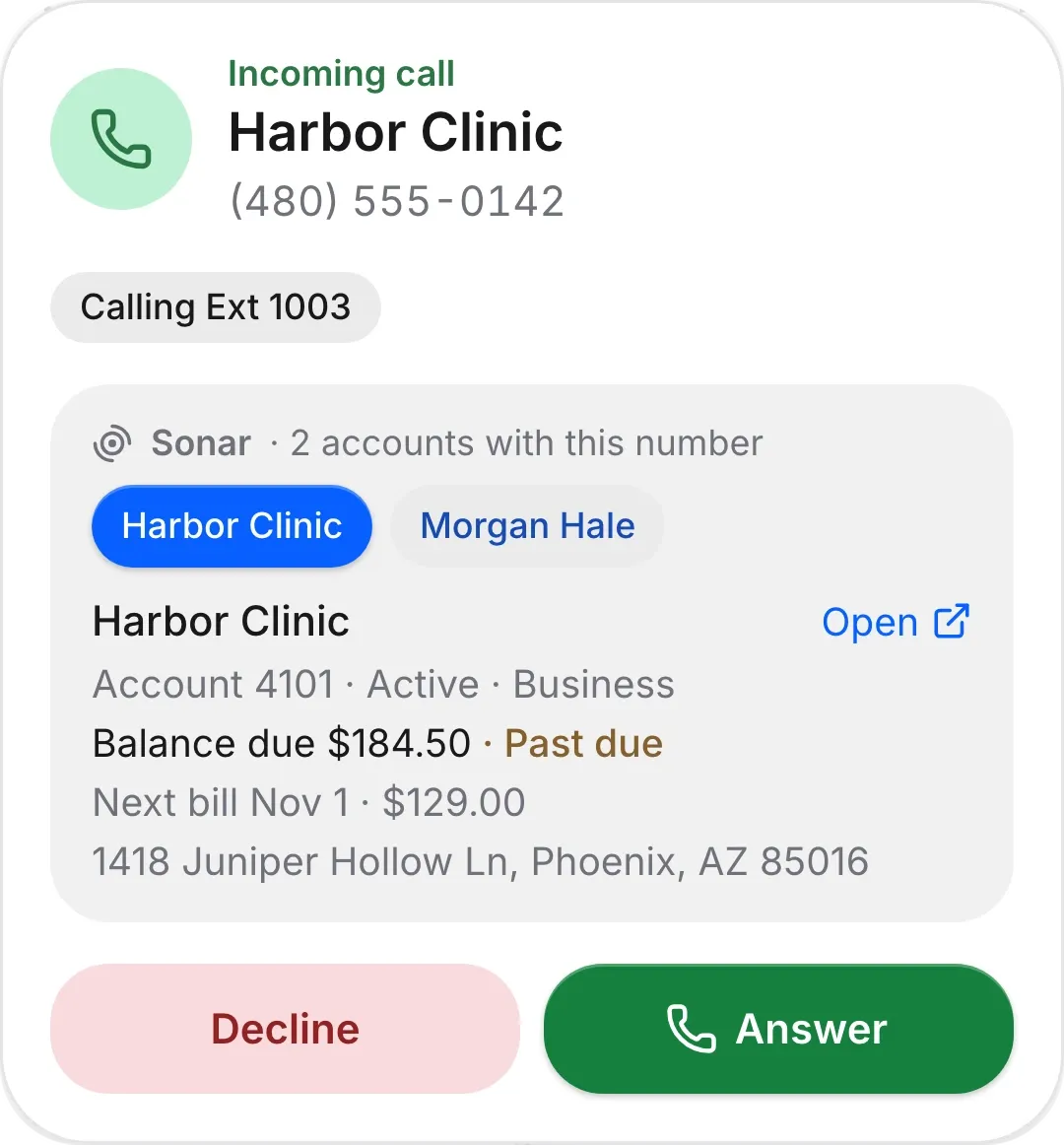
The caller’s account or contact shows while the phone rings, and the finished call is logged back to it, in the system that already holds it.
As it rings
After the call, in Sonar
Harbor ClinicAccount 4101 · Call log
Incoming call
Answered by Jordan Reed (Ext 1003).
Talk time 252 seconds
Incoming call from +14805550142 to +14805550100, Nov 12, 2026, 9:05 AM MST.
Sonar: the ISP’s support desk.
An ISP connects the Sonar it bills from. Its desk answers with the subscriber’s account in view, calls subscribers back from Sonar, and keeps every call on the account.
The Sonar integrationAnswer with the account in view
Everyone the call rings sees the subscriber’s account, staff included.
The card shows billing; it takes no payment. Balances show only with Sonar’s permission to read account transactions. A Lead isn’t shown, and a caller Sonar doesn’t know is said to be unknown.Call a subscriber back
From three characters, the dialer and Front desk search Sonar the way Sonar does, with Call on each result and Transfer during a call.
What’s typed is sent to Sonar’s search. Accounts with no phone number aren’t listed.Keep the history in Sonar
Each finished call becomes one of Sonar’s own call logs on the account.
Leads, callers Sonar doesn’t know, calls inside the business and faxes aren’t logged.
maple
In Sonar
- Maple Ridge FarmActive · (480) 555-0177Call
- Ana MapletonActive · (602) 555-0119Call
- Mapleview ApartmentsActive · (480) 555-0163Call
HubSpot: your business customers’ CRM.
A business connects its own HubSpot. Its team sees the contact, company, owner and open deal as the call rings; afterward HubSpot gets the call, and only what the business chooses besides.
The HubSpot integration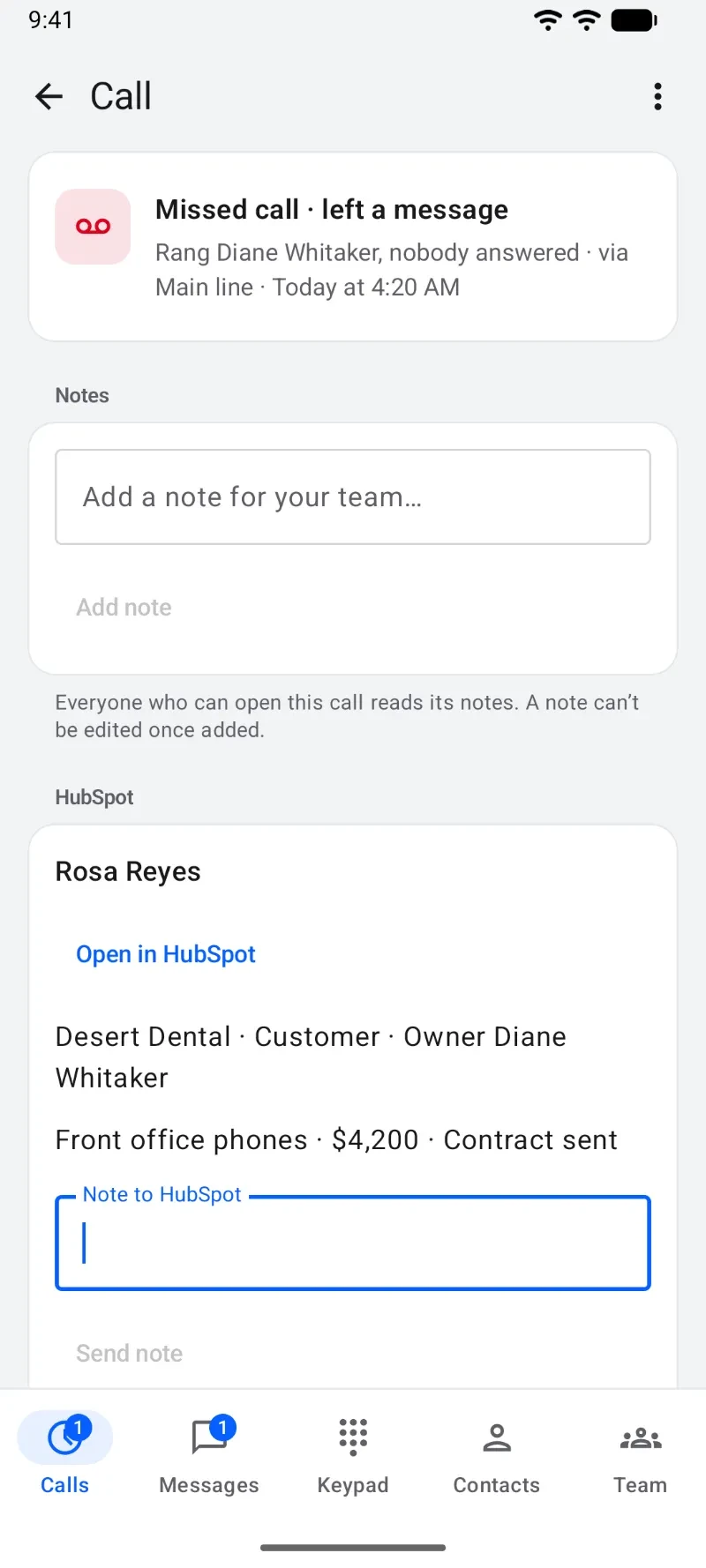
Logged automatically
Call · No answerNot answered; the caller left a voicemail. No owner: a missed call has none.
Only if the business turns it on
Task · Call back Rosa ReyesFor Diane Whitaker, due today
Note · The voicemail’s summary and transcriptNeeds the business’s AI permission for voicemail
Sent by a person
Note · Written in Note to HubSpotBy anyone on the team, sent under the connection
- Credited to who took it. An answered call’s owner in HubSpot is whoever answered or placed it, so HubSpot’s reports count calls by rep.
- What stays here. Recordings and call transcripts stay in the customer’s account, and so do the team’s own call notes. A link to a recording is the business’s choice and asks whoever opens it to sign in.
- Their account. Connected with the customer’s own HubSpot account.
Where Sonar and HubSpot differ.
Both look the caller up by number as the phone rings and log the call when it ends. A business can connect both, each with its own card.
| What | Sonar | HubSpot |
|---|---|---|
| Whose system | The ISP’s own, for its support desk. | The business customer’s own, for its team. |
| Several matches | Up to three accounts offered; the call logged on each. | Each contact offered; the call logged on each, a note on the one picked. |
| Unknown callers | Not logged. Leads aren’t shown or logged either. | Not logged. No contact is made unless someone creates one. |
| After the call | A call log on the account. | A call on the contact’s timeline, credited to whoever took it. |
Other CRMs and industry tools, the same way.
This page highlights Sonar and HubSpot, and they aren’t the only ones. Your own systems connect through the partner API and its webhooks, and another CRM, or the scheduling, practice-management or field-service software your customers run on, can be integrated through the same two steps. Tell us what you and your customers use, and we’ll scope it with you in the technical demo.
Ask about an integration- As the phone ringsLook the caller up by number
- When the call endsLog it on the caller’s record
Partner API
Your own systems, across every account.
Sonar and HubSpot work inside one account. The partner API works across all of them: the REST API the partner portal runs on, for accounts, numbers, devices and calls across every customer you serve.
Evaluate the partner API- Your systemYour billing or ordering system creates a customer
- Partner API
POST /v1/p/accounts
{ "kind": "business", "name": "Brightline Physical Therapy", "active_services": ["hosted_pbx"], … } - 201 Created
Brightline Physical TherapyBusinessOnboarding
In your partner portal. Its owner’s setup link waits until your team marks it live.
On a voice line
AI voice agents answer a line.
Not a record beside the call: the business’s own agent takes the call.
The AI receptionist- A caller dialsThe business’s voice line
- Answered byThe business’s own OpenAI or Grok agent
- It can transfer callers toThe destinations an admin allowed
Talk through the systems your team already runs.
Bring the billing system you run, the CRMs and apps your customers rely on, and what your own systems need from ours. We’ll show a call with them connected, and say plainly what’s built and what connecting the rest takes.