Find what was said. Hear how it was said.
A recorded call opens on its own page: play it, search it, jump to any word. Ask for its transcript and it comes with a summary and the follow-up, each pointing to the moment it came from.
Interactive examplePress play, or a time in the summary to hear where it came from.
Davis Mary
(480) 555-0121Caller ID
Name said on the call: Mary Davis
- Incoming call
- 1m 3s
- Answered by Mary Collins
- via Main line
- Wed, Sep 30 at 1:03 PM
Transcript English
Mary Collins
Davis Mary
Mary Collins
Mary Collins
Davis Mary
Mary Collins
Mary Collins
Davis Mary
Mary Collins
Davis Mary
Mary Collins
Davis Mary
Davis Mary
(480) 555-0121 · Incoming call · 1m 3s · Answered by Mary Collins · Wed, Sep 30 at 1:03 PM
Mary Collins 0:02
Hello, this is Harper Valley National Bank. My name is Mary. How can I help you today?
Davis Mary 0:07
Hi, my name is Mary Davis. I lost my credit card. Can you send me a new one?
Mary Collins 0:16
Yes, I can. One second please.
Mary Collins 0:33
Which card would you like to replace?
Davis Mary 0:36
My credit card.
Mary Collins 0:39
Credit card.
Mary Collins 0:41
Okay, I have put a replacement for your credit card. It will be coming in the mail within three to five business days.
Davis Mary 0:42
Yes.
Mary Collins 0:49
Is there anything else I can help you with today?
Davis Mary 0:52
No, thank you. That will be all.
Mary Collins 0:56
Thank you for calling. Have a great day.
Davis Mary 1:00
You too. Bye now.
Summary
Lost credit card replacement request
Follow-up needed after this call
A replacement card was ordered and is expected by mail within three to five business days. Mary Collins promised this at 0:41
Written by AI from the transcript. Check anything important against the recording.
- Find it, then hear it. A search marks every match in the words and on the recording; any word plays from where it was said.
- Every sentence shows its source. The summary, follow-up and commitments each play from the line they came from.
- Written for people. The summary and follow-up are for someone to read and check against the recording. Nothing acts on them by itself.
Five questions about a recorded call, five separate answers.
Recording a call, playing it, asking for its transcript and reading it are separate questions. Only one answer carries over: whoever may play a call may read what it became. What your team can open is its own answer.
Which calls are recorded
The calls the business’s rule names, and the ones a person chooses to record.
Owners and admins choose incoming, outgoing and internal calls, with exceptions by extension, and whether a short notice plays first. People they allow can start, pause or stop recording on their own call.
Only a recorded call has anything to play or transcribe. Whether a call may be recorded, and the notice callers need, is the business’s responsibility under the laws that apply to it.
Company settings › Call recording
Who’s recorded
- Incoming callsCalls from outside the company.: recorded
- Outgoing callsCalls to outside the company.: not recorded
- Internal callsCalls between business extensions.: not recorded
On the call
AnnouncementStandard messageA short notice that the call may be recorded plays first.
Who may play a recording
Owners and admins, always. Staff, as the business chooses.
Who can listen gives staff no calls, their own calls, or every call they can see.
Each play or download in the portal shows in the account’s Activity.
Company settings › Call recording
Who can listen
Who may play and download recordings and read their transcripts in Call history. Owners, admins and Support always can.
Staff can listen to
- No callsStaff play no recordings and read no transcripts.
- Their own callsCalls they placed, answered, were consulted on or hosted.: chosen
- Every call they can seeAny call Call history shows them.
Who may ask for a transcript
Someone who may play the call, once three separate answers are yes.
Business accounts only. Each answer comes from someone different, and none gives another.
Nothing is transcribed by itself. Each request is one call, and transcripts and summaries are charged by the AI minute.
Turned on · Your team
Call transcription
A feature switch for each business, in your partner portal.
Allowed · The business
Call transcription and analysis
Its AI permission, from its owner or an admin signed in as themselves.
Asked · One person
Transcribe call
On one recorded call they may play, after accepting once for themselves.
Who may read the transcript and summary
Exactly the people who may play the call.
The transcript and its summary follow the recording’s permission. Whoever can’t play a call can’t read its transcript or summary.
What’s saved and what’s new are separate. If the business turns its AI permission off, new requests stop; transcripts already made stay readable until they’re deleted or their retention period ends. A saved transcript never permits a new one.
May play the call
- Recording1:03
- TranscriptEnglish
- SummaryWritten by AI
May not
Your company doesn’t let you listen to this call.
What the call’s page says in their place: the portal offers them no recording, transcript or summary.
What your team sees
A call’s details in your partner portal. The recording itself only inside the customer’s portal.
The window is our desk’s. Your Admin and Staff open recordings through Open portal without one.
Your partner portal
That a call was recorded
With the call’s details. Never the audio, the transcript or the summary.
Open portal · Admin and Staff
Every recorded call, at any time
Inside the customer’s portal, as its owners can. Each play or download shows in its Activity as Support.
Our desk
Only in an approved window
Traces, captures and recordings of the customer’s calls, on the days its owner or admin approves, kept up to 72 hours after the window ends.
Each provider that processes a transcript, and what deleting removes, is on Data and AI.
Before the page above, and away from the desk.
How Davis Mary’s call got its transcript, in three steps in the business portal. Then recorded calls in Everyline, for whoever may play them, on a Mac or an iPhone.
From Call history to the transcript
In Call history
Name, number or words said
AllRecordedTranscribed
Davis Mary(480) 555-01211:03
The Recorded view lists every call with a recording. Once calls are transcribed, search finds the words said.
In its panel
Recording1:03
Transcribe call
Share this call for transcription and analysis?Allow and transcribe
Offered to whoever may play the call. The first time, each person accepts for themselves.
Once it’s ready
Transcript
Lost credit card replacement request
Service issue
The caller reported a lost credit card and asked for a new one.
Open transcriptUnder the caller it says Transcribing… until then. Open transcript leads to the page above.
Away from the desk, in Everyline
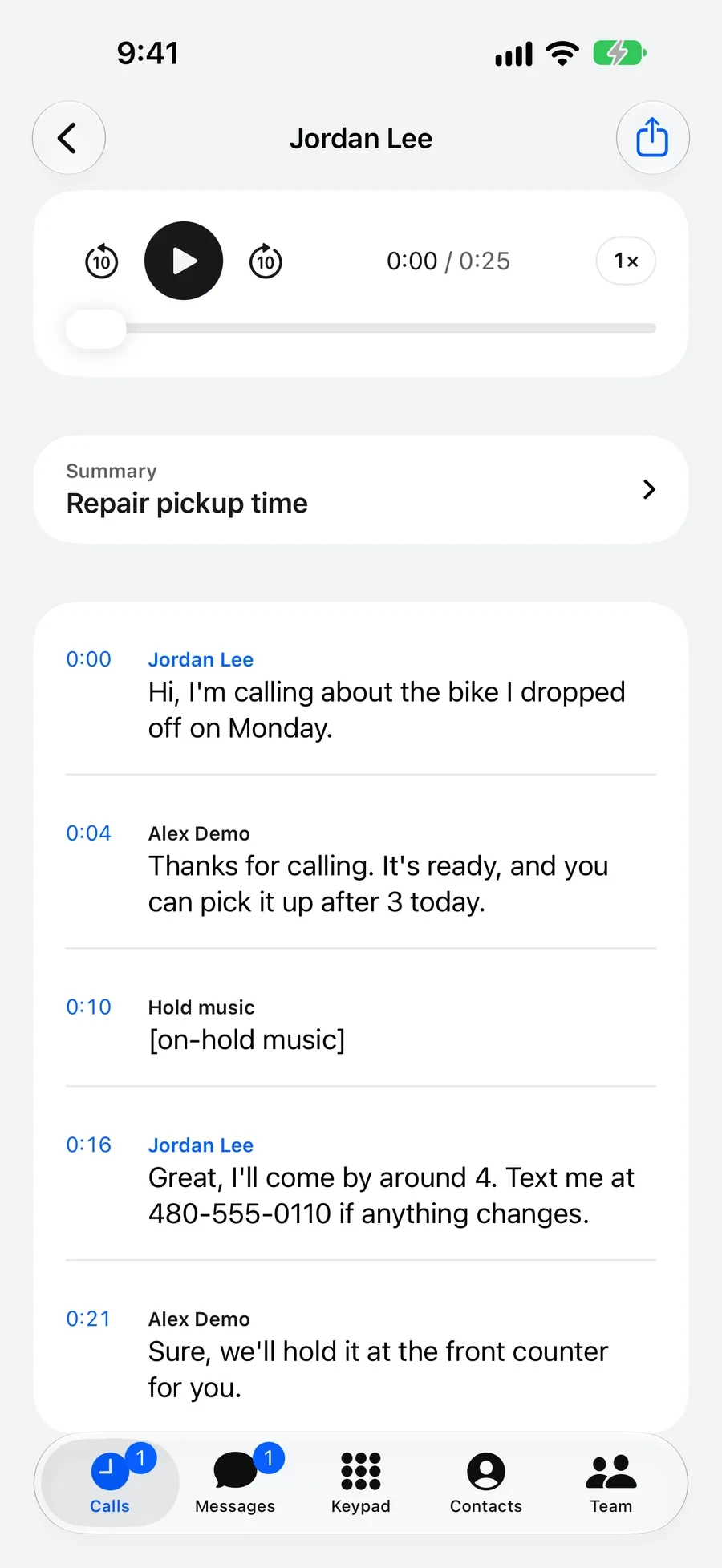
Someone between meetings opens a recorded call on a Mac or an iPhone: its summary first, then the transcript line by line.

Recording in every seat. Transcripts by the minute.
Prices are quoted for what you sell. Being in the price never switches anything on: each account’s setup and permissions decide what runs.
How Carrier Grade is pricedEvery business seat
Call recording, kept 90 days
Every business seat keeps an account’s recordings for 90 days.
By the AI minute
Transcripts and summaries
By the minute, for each call someone asks to transcribe.
By the gigabyte
Recordings kept longer
Recording storage past the 90 days in every business seat.
Separate from the price: recording is turned on per account, your team turns Call transcription on for each business, the business allows its AI processing, and someone asks for each call.
Show your customers what their calls said.
We’ll walk through recording, transcripts and the permissions behind them, on the kinds of accounts you serve.