How our network is built, and who runs each part.

Apps, desk phones and portals reach our platform by separate paths, and upstream carriers connect it to the wider phone network.

Choose a part: who runs it, and what your team sees of it.

Your customers and your team

Carrier Grade

Upstream

Portals and the partner APIPortals and APIBusiness, home and partner portals
Every other networkOther networksThe other caller’s provider

Everyline apps and the browser

Operated by
Your customers use them. The apps are ours, named Everyline, with your brand inside.
What your team can see
How each call sounded on the app’s or browser’s side, measured and graded on its call page.
Its path
WebRTC to the media service, which joins the call to our voice node with SRTP required.

Desk phones, adapters and PBXs

Operated by
Your customer, with phones you supply and assign; a PBX on a SIP trunk is the business’s own.
What your team can see
Each phone’s registration, when it last registered and whether it fetched its settings. No call-quality reports yet.
Its path
SIP straight to our voice node; TLS and SRTP where the device or PBX supports and is set for them.

The customer’s internet

Operated by
The customer or its internet provider. Sometimes that’s you.
What your team can see
Phones at one site that go offline together, flagged as a possible site connection problem.
Boundary
It carries the apps’ WebRTC, the phones’ and PBXs’ SIP and the portals’ HTTPS to our platform.

Real-time media for the apps

Operated by
A cloud media provider, on our account. It joins each app and browser call to our voice node.
What your team can see
The app’s or browser’s measured leg, on each call’s page.
Boundary
Only app and browser calls pass through it. Desk phones and trunks don’t.

Our voice node

Operated by
Carrier Grade.
What your team can see
Every call’s events, which become its journey: the number dialed, the rule that applied, who rang and how it ended. Live calls across your accounts.
Depends on
The account service, to route each call. Which nodes serve your accounts is confirmed in your technical review.

Account service and records

Operated by
Carrier Grade, on Google Cloud.
What your team can see
Everything the portals and the partner API show: accounts, numbers, phones, routing, call history and Insights.
Dependency
Voice nodes look up each call’s routing here, so routing needs it. When a voice node can’t reach it

Carriers we connect with

Operated by
Upstream carriers, and beyond them the other caller’s own provider.
What your team can see
How each call ended. Which carriers we use stays with us; a port shows only the losing or winning carrier.
Boundary
Our desk takes a carrier’s problem up with the carrier.

From one call to a whole site.

Inspect call quality, phone registrations and possible site issues across your accounts.

A call’s page in the partner portal: Pat Ramirez to Harper Valley National Bank, graded Poor. Why it sounded the way it did, “only what was collected; desk phones and trunks say nothing until they report”: ext 101 on the iPhone app lost 6.4% of what it heard, with 58 ms of jitter, a 340 ms round trip, 2 reconnects and a network change. Each measured leg: grade Poor, heard loss 6.4%, jitter 58 ms, sent loss 1.1%, round trip 340 ms, 2 reconnects, on cellular.
  1. The grade comes from what the app measured on its side of the call.
  2. Apps and browser only. Desk phones and trunks don’t report their own measurements yet.
  3. What it helps you check: the connection on the app’s side, before bringing in our desk.
The same call’s timeline
The same call’s events: ring at ext 101, answered on the iPhone 4 seconds in, its worst stretch of quality at 96 seconds, 5 seconds long, and the hang-up at 188 seconds, normal clearing.

Further down the same page: its worst stretch, 5 seconds long, came 96 seconds in.
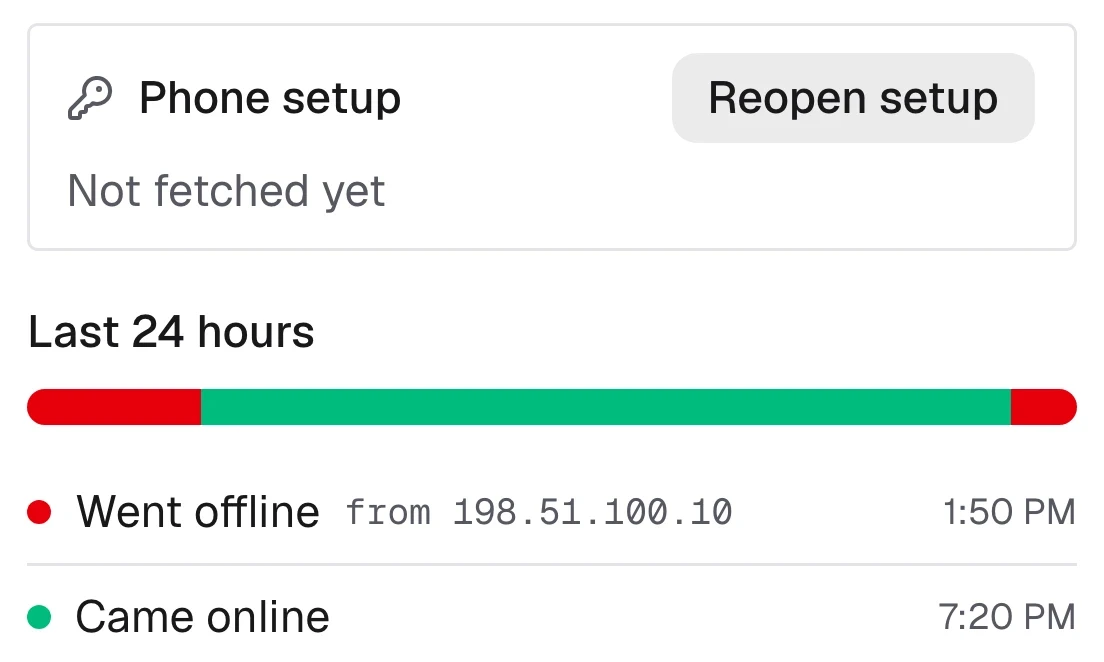
Part of a desk phone’s panel in the partner portal: phone setup not fetched yet; over the last 24 hours it went offline at 1:50 PM from 198.51.100.10 and had come online at 7:20 PM.

Phone connection history

Registrations over the last day; whether the phone fetched its settings is a separate fact. Phones and devices

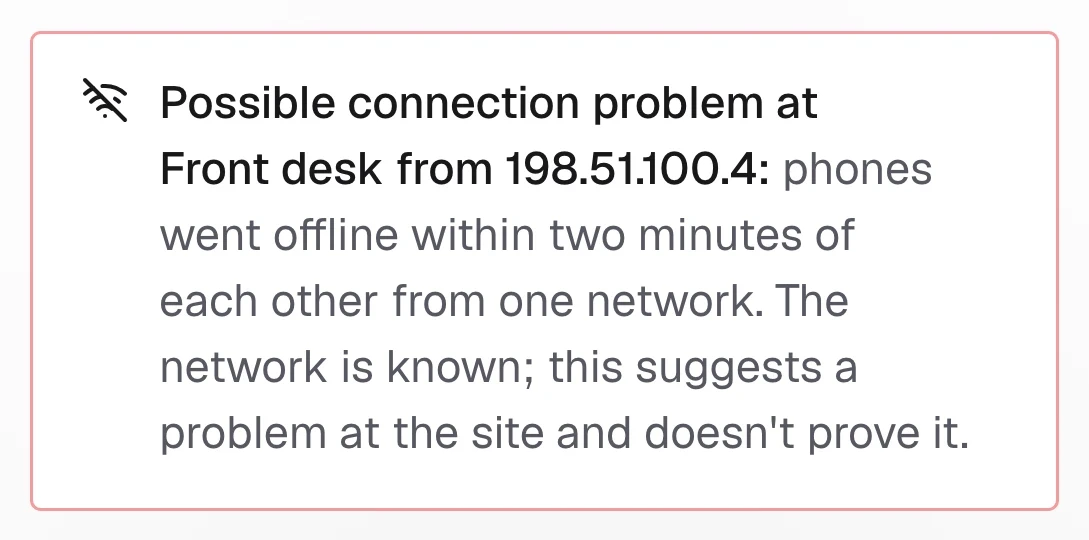
The partner portal’s flag on an account’s Devices and sites: possible connection problem at Front desk from 198.51.100.4; phones went offline within two minutes of each other from one network. The network is known; this suggests a problem at the site and doesn’t prove it.

Possible site issues

Flagged on the account and in your morning list as a lead to check, not a confirmed cause; alerts go to the people you choose.

When a part fails.

As the platform behaves today, by who runs the part.

On your customers’ side

A phone or an app

Callers notice: It doesn’t ring

Next: The account’s routing goes on to its other phones and next steps

A site’s internet

Callers notice: The site’s phones don’t ring

Next: The business’s outage backup sends calls where it chose

How outage backup works

A PBX on a SIP trunk

Callers notice: Its phones don’t ring

Next: Calls take the trunk’s fallback, set in onboarding

Run by Carrier Grade

The account service, seen from a voice node

Holds: Phones stay registered with the voice node

Doesn’t hold: Calls still need the account service to route

The portals and the partner API may be unavailable. Phones staying registered is verified on our current voice node only.

Real-time media for the apps

Callers notice: App and browser calls are affected

Next: Desk phones and trunks don’t pass through it

Something else on our side

Callers notice: It depends on the part

Next: Our desk handles it and posts a notice in every signed-in customer portal

Next: Your team stays your customers’ first contact and escalates to our desk

Upstream

A carrier we connect with

Callers notice: Calls through that carrier are affected

Next: Our desk takes it up with the carrier

  • Google Cloud

    The account service and its database, the portals, call records and analytics

  • Cloud object storage

    Recordings, voicemail audio and faxes, apart from the account database

  • A cloud media provider

    Real-time media for the apps and browser, on our account

  • Voice-node hosting

    Your technical review confirms which voice nodes would serve your accounts and where they run.

Bring your network engineer and your busiest hour.

Bring your phone counts, device mix, busy-hour demand and expected concurrent calls. We’ll review capacity, addressing, encryption scope and deployment requirements for the nodes that would serve your accounts.