Close early in one press. The weekly hours stay put.
Every business number follows a few rules in a fixed order, and the portal shows which one decides each call right now. Owners close early or forward calls from the portal or Everyline; you decide how much more they can change.
Try it: close early, then end the closure.
Harper ValleyMain line (602) 555-0100
Tuesday, 2:10 PM · Eastern time
Every call checks these in order. The first that applies decides where it goes.
- Closure or forwardTurned on by hand, for a whileNothing onSends calls to Its own message and destination
- HolidaysSpecial days in Branch hoursNo special daysSends calls to That day’s own hours
- Branch hoursMon–Fri 9 AM–5 PM · Sat 9 AM–noonOpen until 5 PMDecides the call now, sending it to MenuMain Menu
- Outside hoursNights, weekends, closed daysFrom 5 PMSends calls to VoicemailMember Services voicemail
Branch hours are open, so calls to the main line go to the Main Menu.
Today: Main Menu from 9 AM to 5 PM, Member Services voicemail before and after.
Branch hours are open, so calls to the main line go to the Main Menu.
Company call routing
Close now
What changes
Branch line (602) 555-0103
Now Member Services, then Member Services voicemail
Main line (602) 555-0100
Now Main Menu, then Member Services voicemail
Card services (602) 555-0101
Now Card Services, then Member Services voicemail
Not affected: Loans (doesn’t follow company routing) and Fax (fax only).
Company call routing
Closed: Weather
Saved closures 2 of 5
- WeatherStraight to Member Services voicemailOn
- Staff trainingMessage, then Member Services voicemailOn
A closure is for today. The schedule is for every week.
A schedule is saved once and holds. A closure or a forward is switched on for a while, comes first, and leaves the schedule exactly as it was.
Switched on for a while
Closures and forwarding
- Close now turns on a saved closure: a message if it has one, then a destination, or the call ends.
- Up to five saved closures and one forward. Forward all calls goes to a mobile, another number or anywhere in the phone system. One is on at a time.
- It runs as long as chosen: 1, 2, 4 or 8 hours, the rest of the day, until a date and time, or until someone presses End now.
- It reaches every number that follows company routing. A number set to ignore hours and closures keeps its own route.
Saved for every week
Hours and holidays
- Each number follows its own schedule, so a branch, a team or a support line keeps its own week.
- Weekly hours can split a day or send part of it elsewhere. Outside them, callers hear the schedule’s message, then go where it says.
- A holiday replaces that day’s hours. The portal lists the usual holidays not set up yet, each closed or given special hours in a press.
- A schedule switched off sends each of its numbers to its usual destination.

- Now, outlinedThe rule each number follows at this moment, and where it sends calls.
- Its own routeLoans ignores hours and closures; Marcus Bell takes its calls.
- When you close or forwardThe same for the three numbers that follow company routing.
Then a menu, a group or a mailbox takes the call.
Hours and closures choose a destination. Each destination says what happens next, so the business decides where a call goes when nobody picks up.
Ring groups
Phones ring all at once, in order, in random order or rotating.
Nobody answers The group’s next step.
Call queues
Callers wait in line for the next free agent, with an overflow step when the wait runs long. Contact center
The wait runs long The overflow step. Queues and callbacks come with every business seat, turned on for the accounts that use them.
Voicemail
A person’s mailbox or a shared one, emailed with the recording and written out where the account allows it.
The message is left Where most routes end.
When nobody answers
The next step is the business’s choice: another group, a person, a queue, a menu, a mailbox, an outside number, or ending the call. The portal points out a number that isn’t set up, a ring group or menu that would hang up on a caller, and a queue with no way out.
Setup
Back office hangs up when no one answers.Edit ring group
The day’s changes stay with the business. The setup stays with you.
Closing early never waits for you. How much of the routing itself a business sees and changes is yours to decide, business by business.
Customer portal visibilityThe business, day to day
Close, forward, end
- Owners and admins close early, forward every call and end either one, from the portal’s Overview or Everyline for iPhone and Android.
- Staff see what’s on and that their administrator manages it.
You, the provider
Routes and how much is open
- You set up each business’s schedules, menus and groups at onboarding, opening its portal from your partner portal.
- You choose a level per business: Hidden, View only or Can change.
| Action | Hidden | View only | Can change |
|---|---|---|---|
| Close early, forward calls, and make or end closures | Yes | Yes | Yes |
| See hours, holidays, menus, ring groups and queues | No | Read only | Yes |
| Change hours, holidays, menus, ring groups and queues | No | No | Yes |
Every call keeps the path it took.
In call history, each call opens what happened to it: the number dialed, the rule that applied, where it went and who answered.
Call history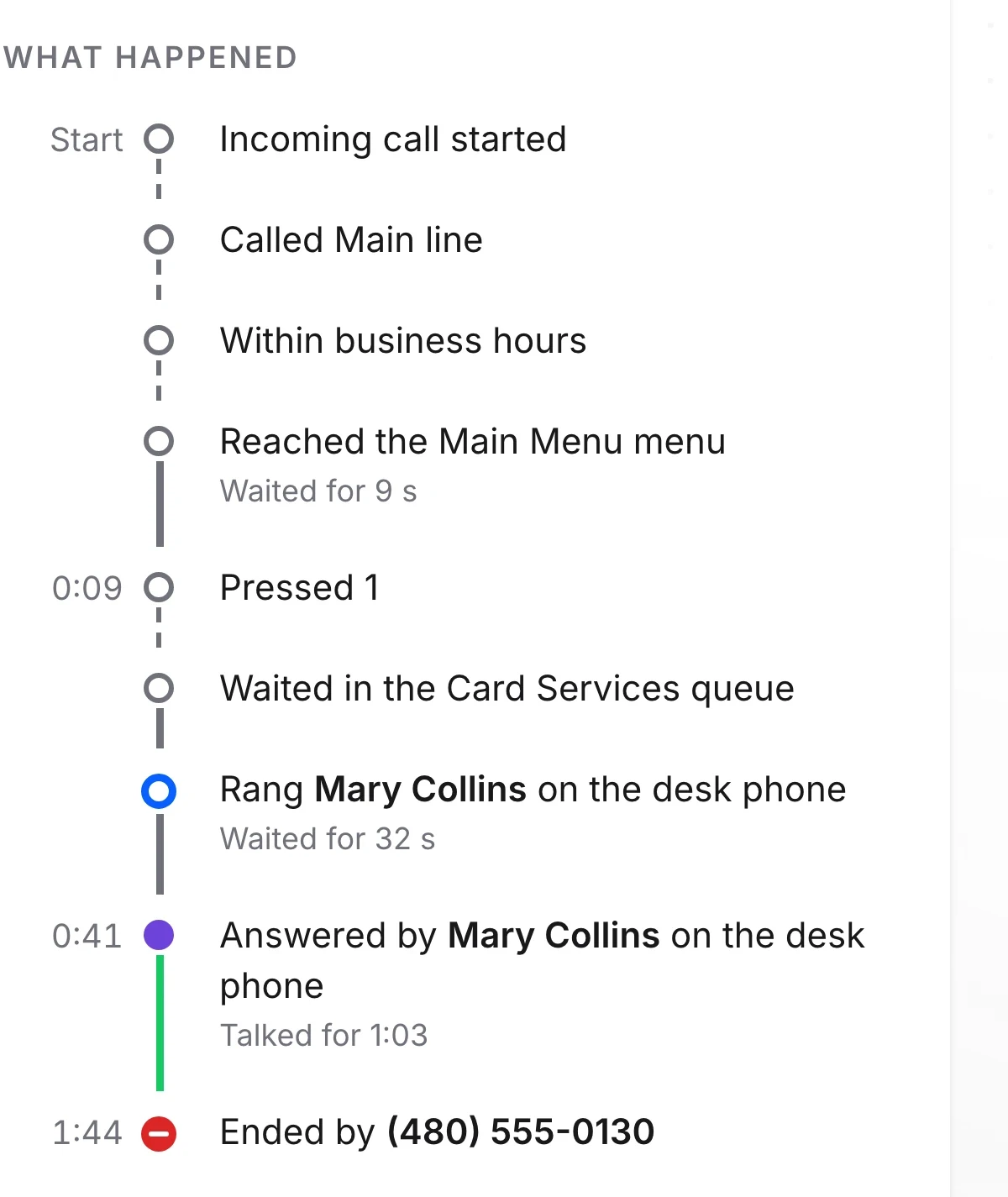
Routing your customers can run. Under rules you set up.
We’ll set up a sample business under your brand, close it early, and show you what its owner, its staff and your team each see.