Every call, counted and explained, down to the caller still waiting.
Insights shows a business when calls arrive, where they go, who answers and who was missed, and every figure opens the calls behind it. Where the business allows it, AI adds why people called.
Interactive exampleChoose what became of October’s missed calls, then open one.
- 2,494calls in
- 602not answered
- 443missed
By the bank’s rules the other 159 aren’t missed: 157 came while it was closed, and 2 asked a queue for a call back and wait on its callback list.
What became of the 443 missed calls
The first thing that followed each one within a week, day by day.
Called back71 calls, 16% of the 443
Called back within 15 minutes, 86% were reached; later, 62%.
Nobody yet 128 calls
Nothing followed: no call back, no answered call, no mark.
128 of the 443 missed calls (29%), from 73 callers still waiting
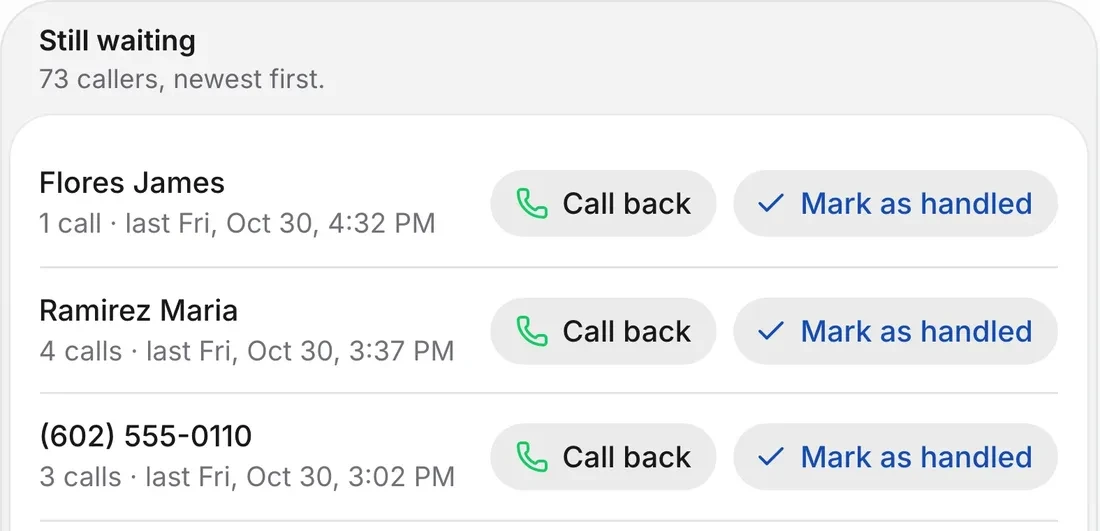
The 6 newest of 73 callers, as Still waiting lists them.
1What’s happening across the calls
Where 2,494 calls went, and who picked up.
Caller journeys follows every call from the number dialed to how it ended. Every box opens its calls.
Routing and hours- Number dialedMain line, 1,904 of 2,494.
- First thing heardMain Menu 1,784; closed message 157.
- Where it rangMember Services 805, Payments & Transfers 639, Card Services 596.
- Who answeredNobody, 602. The most: James Whitfield, 199.
- How it endedAnswered 1,892, hung up 441, left a message 161.

Summary, against the 30 days before
- Calls in
- 2,494
- 7% fewer
- Answered
- 76%
- No change
- Not called back
- 73
- 4% fewer
- Time to answer
- 1 min 1 s
- 5% quicker
Busiest: Thursdays, 2 to 3 PM, with 97 calls and 17 missed across the five.
Choose any hour in busy hoursWho called back top five of the 71
- Patricia Hughes1155% reached · half within 48 min
- David Park1060% reached · half within 32 min
- Mary Collins978% reached · half within 18 h 42 min
- Elizabeth Moreno863% reached · half within 14 min
- Robert Alvarez863% reached · half within 51 min
How teams are measured
- Queues. Answered within the queue’s own goal (80% in 30 seconds until set), average wait, hung up waiting, and the callbacks callers asked for: called back, reached, still waiting.
- Ring groups. Who picks up, lets it ring or is busy, and on which ring.
- People. Calls answered and made, talk time, missed calls called back and how soon; a person’s month against the team’s middle.
2Where the team needs to act
Then someone calls them. Or marks them handled.
The same callers in the bank’s own portal, each with Call back and Mark as handled.
- Call back dials from the browser where calling is set up, or hands the number to the computer’s phone app. Any call back takes the caller off the list; Reached says whether it was answered.
- Mark as handled is for a caller looked after another way: they leave the list, the call stays missed, and a later missed call brings them back.
- A goal on callers not called back sends a morning alert by email, text or the app when the count slips past it.
3What they can learn
Ask in plain words. The answer is a count of calls.
An owner or admin asks in their own words. AI interprets the question; Insights calculates the result from call records.
The question
“How many calls did we miss last week?”
One of Ask’s own examples.
The measure it defines
- What to count
- Missed
- Split by
- Nothing: the totals
- Which calls
- Calls in
- Dates
- Oct 19 – Oct 25
Read from the question, today’s date and the bank’s setup. AI never sees a call, a recording or a figure.
The counted result
124
missed calls in the bank’s call records, by its missed rule, as Week at a glance counts them.
The calls behind it
- Nguyen CatherinSat, Oct 24, 11:02 AMMissed · Card Services
- (623) 555-0109Sat, Oct 24, 10:33 AMMissed · Member Services
- Cruz MeganSat, Oct 24, 9:47 AMMissed · Card Services
and 121 more.
In every business seat with Insights on; its first use asks for the business’s “Ask in Insights” AI permission. Ask counts calls; who was called back is in Missed calls.
Topics read the conversations themselves.
AI groups transcribed calls by what they were about and flags those that need a follow-up: 691 of the month’s 3,261 calls were transcribed because someone asked, and 36 need one.
- Insights turned on by your team
- Call Transcription turned on for the business
- Call transcription and analysis allowed by the business
- Transcripts and summaries charged by the AI minute

Reports that keep coming.
The same counts, delivered: each week, by email, on a schedule or against a goal.

- Week at a glance
- Up to six findings, from the hardest hour to who’s still waiting, each with a next step.
- The weekly email
- Monday at 7 AM in the business’s time, to each owner or admin who asks: Summary’s plain words, four figures and three findings.
- Reports
- Six to start from and the business’s own: up to four measures, a split, a chart or a table, downloaded as CSV or emailed weekly or monthly.
- Goals & alerts
- A target for calls answered, time to answer, missed calls or callers not called back, tried against the last 30 days before it’s switched on.
You switch Insights on. The business decides about AI.
Insights and Ask come with every business seat, and each account starts with Insights off until your team turns it on. What AI may read stays the business’s own choice.
| What the business gets | Your team turns on | The business allows | Charged |
|---|---|---|---|
| Missed calls, charts, reports and the weekly email | Insights | No AI permission: counted from call records | In every business seat |
| Ask in Insights | Insights | Ask in Insights | In every business seat |
| Transcripts and summaries | Call Transcription | Call transcription and analysis | By the AI minute, for the calls someone asks to transcribe |
| Topics | Insights Call Transcription | Call transcription and analysis | Read from the transcripts above |
In your partner portal
- Turn Insights on per business, in bulk or when you create the account; call counts on other pages stay either way. Call Transcription is turned on for business accounts.
- Your partner portal shows each call’s details, the route and how it ended, and that it was recorded; never the recording or its transcript. How your team reaches customers’ calls
In the business’s portal
- Insights is for its owners and admins. Staff keep Call history.
- Its owner, or an admin who is a named person, allows each AI permission after reading what’s sent. Your partner logins and our desk can’t allow it for them. What each permission sends
Every call, counted and explained. Under your brand.
We’ll walk through a month of sample calls with you: where they went, who was missed and called back, what AI read and what it didn’t, and how you switch Insights on account by account.