Hand callers on, without losing one.
Front desk shows who’s free before you send a caller anywhere. Park puts them in a numbered slot the whole business can see, until the colleague they asked for picks up on Everyline, a desk phone or the browser.
Try it: answer Grace Holloway. She’s asking for Ben Ruiz, the technician on her car.
- Front deskAna TorresRinging
- Slot 701ParkFree
- Ben RuiziPhoneDo not disturb
Ana Torres’s viewHas the callFront desk, in the business portal
Front desk
1 waiting · 1 of 4 free
Company calls: normal
Your call
No call right now.
Waiting 1
On hold
Nobody on hold.
Parked
Anyone can dial the slot to pick up.
Nothing parked.
Everyone
- Ben Ruiz 104Do not disturb
- Carla Mendez 102On a call · 4:12 · with (602) 555-0110
- Luis Ortega 103Free
- Owen Hart 105Phone offline
Ben Ruiz’s viewHas the callEveryline for iPhone, Team
Team
OpenDo not disturb on
On calls now · 1
- Carla MendezWith (602) 555-0110 · 4:12
Parking
Slots 701 and 702 are free.
On a call, tap Park and the caller waits here until someone picks up.
Hold keeps a caller with you. Park gives them a place.
Both keep a caller waiting while you find the right person. Only a parked caller can be picked up by someone else, from any app or phone that shows the slot.
Hold
- Whose: still yours, on your call bar and in On hold.
- Back: only you, with Resume, or by transferring or parking from there.
- Others see: you on hold, with whom, on their Everyone board.
Park
- Whose: the business’s, in a numbered slot, yours no longer.
- Back: anyone at the business, with Pick up, a park key or by dialing 701.
- Others see: the slot, the caller and who parked them, wherever parked calls show.
Five ways to hand a caller on. Their state picks the likeliest.
Press a colleague and Front desk offers what fits them now, marks one Suggested, and says when a transfer would go somewhere else. Hold and Park are on the call bar too.
- Transfer nowStraight to them, and your line is free for the next call.
- Talk firstThe caller holds while you speak to them, then Complete transfer, or Cancel and go back to the caller.
- Send to voicemailStraight to their mailbox, with no ringing, for anyone whose voicemail is on.
- HoldThe caller stays on your call bar until you resume, transfer or park them.
- ParkThe caller waits in a numbered slot until someone at the business picks up.
| Colleague | Suggested | What Transfer now says |
|---|---|---|
| Luis OrtegaFree | Transfer now | Nothing: it rings them. |
| Carla MendezOn a call · 4:12 | Park | Carla is on a call and hears call waiting. |
| Ben RuizDo not disturb | Transfer now | Ben has Do not disturb on, so it goes where their calls go. |
| Owen HartPhone offline | Transfer now | Owen’s phone is offline, so it goes where their calls go then. |
- Talk first is for the call you’re on; Send to voicemail for anyone whose voicemail is on.
- With a mouse, drag a call onto a colleague to open their choices, or onto Parked to park it.
The page itself,
Your call with the whole call bar, Park among it; callers waiting in a queue with Take; On hold and Parked always in view; and a colleague’s choices open, Transfer now saying where it would really go.

Every app shows the slot. Desk phones get a key.
Parked calls show to everyone at the business, staff included: who’s waiting, who parked them, and Pick up. Each app does it in its own way; a desk phone shows a slot as a park key from its key layout.
Everyline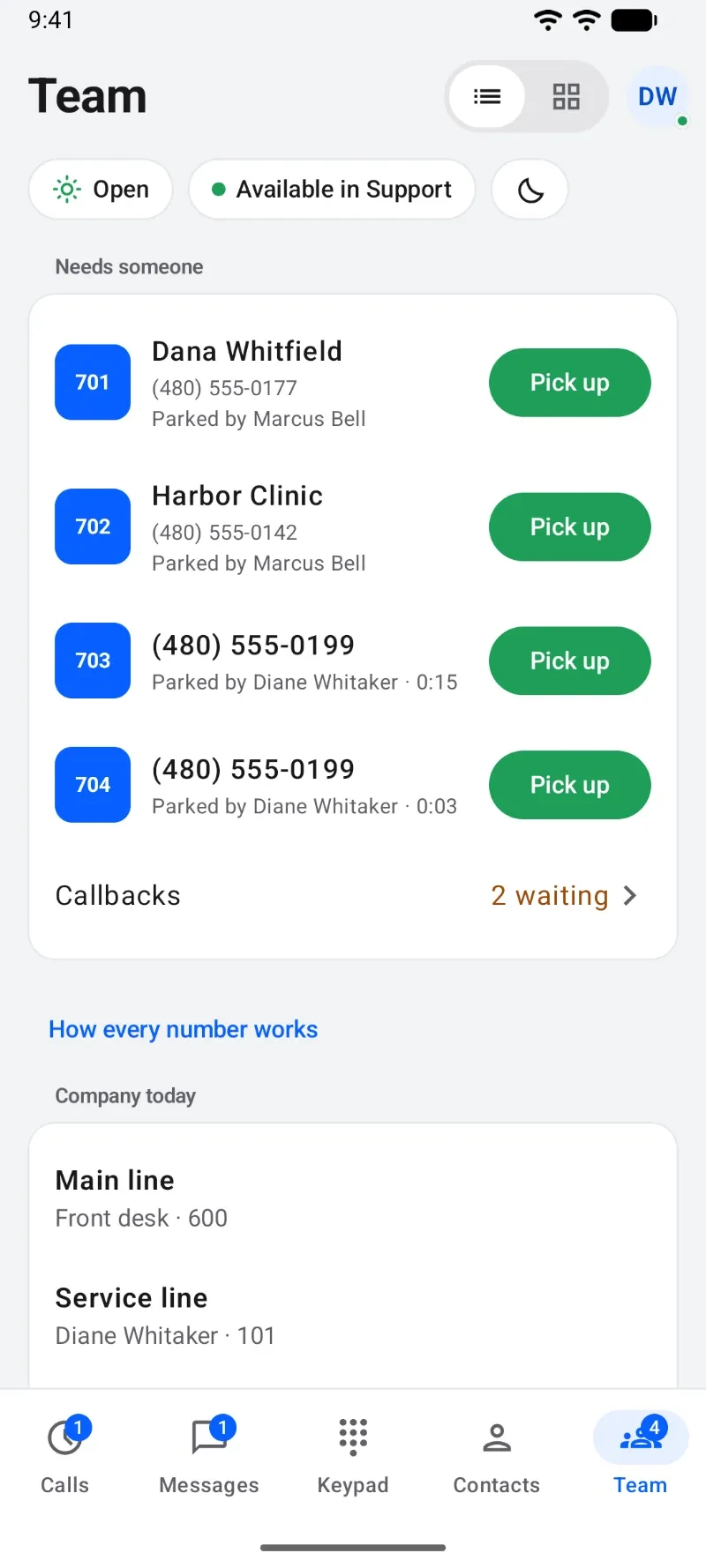
- The business portal, in the browser
- Front desk’s Parked list, and on every page a Parked pill while a call waits, “2 parked”, opening the same list. The call bar’s Park takes the next free slot; its menu names each one.
- Everyline for iPhone and Android
- Team lists parked calls first, under Needs someone; as a switchboard, each slot is a tile, Free or taken. Park on the call screen opens Park in a slot, Next free slot first.
- Everyline for Mac
- A Parked pill while a call waits, and Park’s slot pad: each slot free, or its caller and how long they’ve waited.
- Any phone at the business
- Dial the slot, 701 or *701, to pick up. A slot already taken refuses a second caller.
Reception layout
- 1Line 1
- 2Line 2
- 3Park 1*701
Park keys from a key layout
New key layout’s Reception and Warehouse start with Park 1, the key for slot 701; a layout can hold a key for any slot the business has. Pressed, it parks a call in its slot, or picks one up.
Desk phones and provisioningYou set it up. The whole business uses it.
Park and park keys are ready at onboarding. After that, how much the business changes is your choice, and everyone there can park and pick up.
- You, the provider
- Set up Call park and the office’s key layouts at onboarding, opening the business’s portal from your partner portal, and assign its desk phones from your stock.
- Choose per business how much its owners and admins change: Hidden, View only or Can change.
- The business’s owners and admins
- At Can change, Company settings › Call park: park on or off, and how many slots, up to nine.
- Its desk phones’ key layouts, park keys among them.
- Everyone at the business
- Every login, staff included, has Front desk in the browser, Park on the call bar and Pick up wherever a parked call shows.
- With Call park off, nobody parks, and Park leaves the call bar.
See a caller handed on, from the desk to a slot to a phone.
In a demo we answer a sample caller, park them and pick up on another phone, then show what your team sets up for each business.